
The Client Asks a Question Nobody Prepared For
Picture this: an agency is presenting a campaign to a client at 2 p.m. The account manager sends the slides to the team at noon. The creative has just noticed that slide three was edited. The developer doesn't know which part to speak on. In the real meeting, the client asks about budget and deadlines, and three people give three different answers.
This problem isn't about skill. It is about process. Rehearsals are often the first thing cut when a team is spread across different places: setting one up means creating a link, sending a calendar invite and waiting for everyone to join, when it should be something you can do in ten minutes.
This article suggests using an online office as your team's preparation room. For the actual meeting with the client, keep using Google Meet or Zoom as before.
Limits to Know First
- The real client presentation happens outside Zyra. The Features page does not yet list any feature built for outside guests. Clients are usually comfortable with Meet or Zoom already, so keep using those with them.
- Screen sharing and video calls are in the Pro plan, which the pricing page lists as coming soon. On the Free plan you can still rehearse with proximity audio and chat, but you can't share slides on screen for everyone to see at once.
- Don't use chat to keep conclusions. According to the pricing page, channels and threads are in the Pro plan, which has not launched yet. Record the takeaways from each rehearsal in your team's task management tool.
For more on each plan, see the pricing page.
A Step-by-Step Way to Prepare and Rehearse
1. Agree on Roles Before You Rehearse
Before you start, have the team answer three questions clearly.
| Question | Example answer |
|---|---|
| Who opens and closes | The account manager |
| Who explains each part | The creative covers the concept; the developer covers technical feasibility |
| Who answers which questions | The account manager answers budget and schedule; the developer answers technical details |
When everyone knows what they are responsible for answering, there is no moment in the real meeting where everyone waits for someone else to reply.
2. Schedule the Rehearsal in a Prep Room
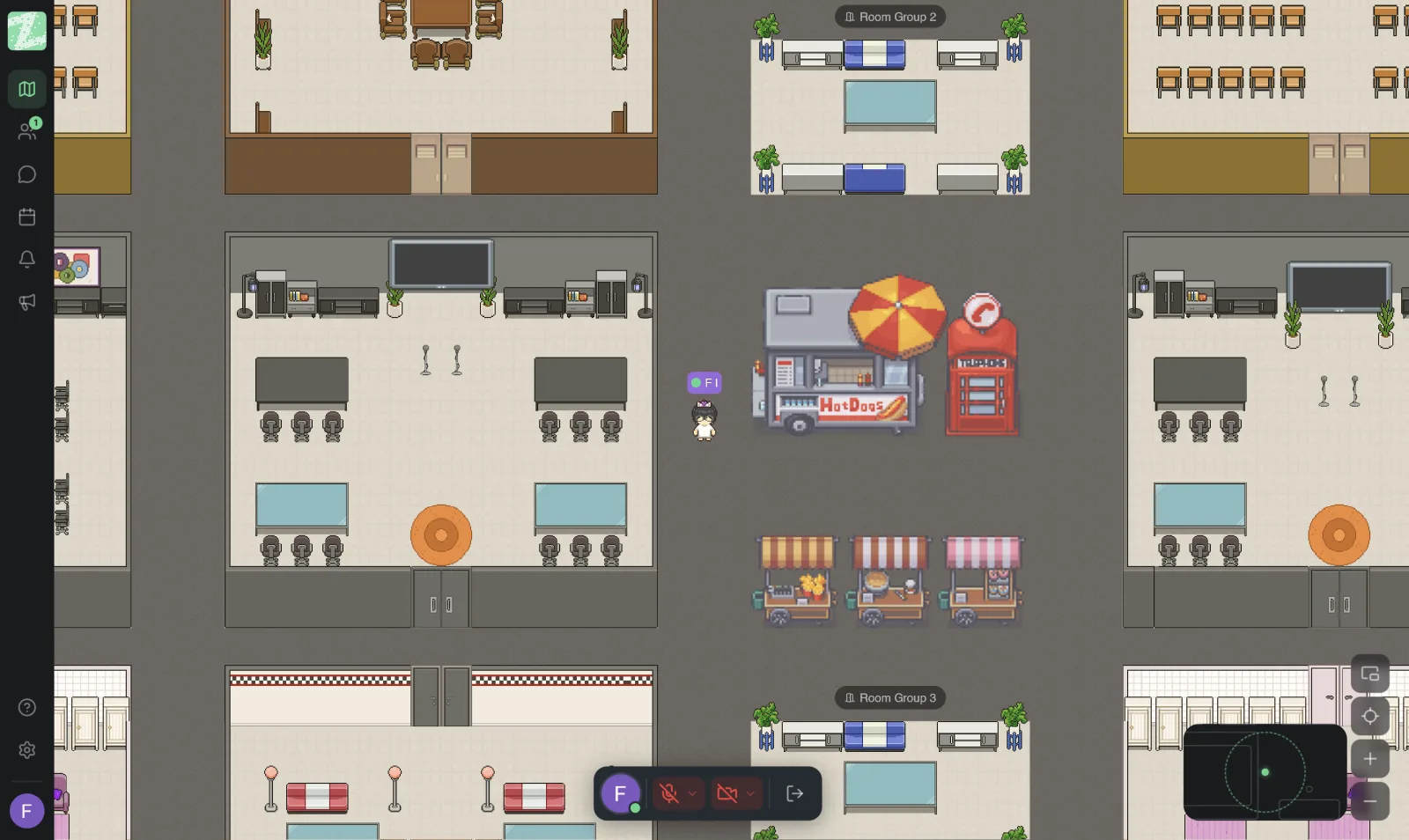
Pick a room on the map as your prep room, set a time, and have everyone walk their avatar in. Audio connects with people nearby, so there is no link to wait for. Anyone caught up in other work can walk in later. The room should be separate from the general area so sound doesn't leak out and disturb others. The Free plan includes 3 rooms per workspace.
3. Rehearse Against the Clock
Rehearse to the actual length of time you booked with the client. Each speaker begins their section in their assigned role while everyone else notes down questions the client might ask. At the end, everyone reads through the questions they noted and agrees who answers each one. The team sees the gaps in the content before walking into the real meeting.
4. Have a Teammate Play the Client
Have one person play the client who asks the hardest questions, such as "Why this direction?", "Can the deadline move?" or "What does this price include?" Practicing real answers exposes unclear explanations that you can't see when reading the slides alone.
5. If You Use Pro: Share Your Screen to Rehearse the Slides
Once the Pro plan is available, the presenter can share their screen in the room, so everyone sees the slides at the same time and can point out changes right away. If you aren't on Pro, send the slide file in advance and have everyone open it on their own device and follow along.
6. Run a Final Rehearsal One Hour Before
Do a short 10-minute run through just the opening and closing, then write three things in your task management tool: what the client needs to decide, what we have already committed to, and what still needs checking. You will use these to follow up after the meeting.
During the Real Presentation
In the client meeting on Meet or Zoom, your team can keep the online office open alongside it. If the presenter needs to signal or ask a colleague during the meeting, use a private message on whichever platform suits the situation, but agree on this beforehand, because switching screens mid-meeting breaks the presenter's focus. A safer approach is to have one assistant note down questions to answer later.
After the Meeting: Debrief Right Away
As soon as you hang up with the client, have the team walk back into the same room for a ten-minute debrief. What else did the client ask for? Who takes which task? When is it due? Record it in your task management tool immediately. Memory is clearest at this point, and you don't need to schedule yet another wrap-up meeting.
Make It a Routine
If your team presents regularly, set a standing rehearsal room and time, such as one day before each presentation. Keep it short but consistent. As the team gets used to this approach, revision rounds after meetings tend to decrease because everyone's understanding is more aligned. For what works in internal meeting formats, see How to Run Effective Online Meetings.
Sources and further reading
Frequently Asked Questions
Can I present to clients in Zyra?
The Features page does not yet list any feature built for outside guests. If you want to use Zyra with clients, contact our team to ask about a suitable approach. In the meantime, keep using Meet or Zoom with clients, and use Zyra to prepare within your team.
Can I rehearse presentations on the Free plan?
Yes, with proximity audio and chat, for teams of up to 25 people. But screen sharing and video calls are in Pro, which the pricing page lists as coming soon.
How many times should we rehearse?
It depends on how important the work is. One full run with someone playing the client, plus one short run before the meeting, is usually enough for typical projects.
What if the client is used to other tools?
You don't need to change the client's way of working. Use the online office only for the internal team, and schedule the client meeting in the tool they already use.
Does a developer need to join the rehearsal?
If the client might ask about technical feasibility, have a developer join, at least for the relevant sections, so the answers match what the team will actually deliver.
Keep Reading
Start With Your Next Rehearsal
Pick your team's next presentation, schedule one rehearsal in a prep room, and compare whether fewer questions go unanswered. You can set up a workspace for free for teams of up to 25 people, and it runs in the browser.
Start using Zyra for free with a team of up to 25
Try Zyra with your team
Free for up to 25 members. It runs in your browser, so there is nothing to install, and there are Android and iOS apps too.