
Proximity voice chat lets conversations form around where people place themselves in a shared space, instead of putting everyone in one call. This guide compares three approaches: Zyra World for shared virtual-office work, Gather for avatar-led interaction, and SpatialChat for video-centered spatial rooms.
In short
- Choose Zyra World if you want avatars, proximity audio, chat and screen sharing in one browser-based shared office.
- Choose Gather if moving an avatar around an office is central to how your team wants to interact.
- Choose SpatialChat if your team prefers a video-centered room to an avatar office.
- Whatever you pick, test conversation boundaries and screen sharing with a real task before making it part of the daily routine.
*Disclosure: this article is written by the Zyra World team, and Zyra World is our own product, so read the comparison with that in mind.*
Why this matters
A scheduled call gathers people into one conversation. Proximity audio lets small conversations form around where people stand in a shared space. That helps when a teammate wants to ask a quick question without calling a meeting, and it raises a decision: how much of the working day should happen in that space?
Separate the interaction style from the feature list. Avatars, video and screen sharing only matter when they make a real task easier. Choose the interaction your team understands, not the office that looks most elaborate.
What makes a good proximity voice chat app?
Use these criteria before comparing individual apps:
- Conversation boundaries: You should understand who can hear a conversation and what happens when someone moves away.
- Approachability: A teammate should be able to find another person and start talking without a long explanation.
- Shared work: Check how chat and screen sharing fit around the conversation, instead of treating voice as the whole workflow.
- Interaction style: Decide whether your team prefers avatars in an office or a video-centered room.
- Focus boundaries: Agree when being in the space means someone is open to interruption and when it does not.
- Joining experience: Test the actual microphone, browser and permissions flow your teammates will go through.
A proximity feature does not replace clear team habits. Decide first whether you want an everyday office, occasional coworking sessions, or a place for informal gatherings.
Proximity voice chat apps at a glance
| App | Fits | Approach | Consider |
|---|---|---|---|
| Zyra World | Proximity audio inside a shared office | Avatars on a shared map with rooms, private zones, proximity audio and video, chat and screen sharing | A shared space is more than you need if you only run scheduled calls |
| Gather | Avatar-led office interaction | A virtual office with avatars where you hear nearby conversations | Moving around adds a step before you speak |
| SpatialChat | Video-centered spatial rooms | A virtual events and meetings platform where volume depends on how close you are to others | A video-centered room is a different experience from an avatar office |
These are different fits, not interchangeable winners. The right choice depends on whether your team wants a working environment, an avatar-led social space, or a video-centered room.
1. Zyra World: a fit for proximity audio inside a shared office
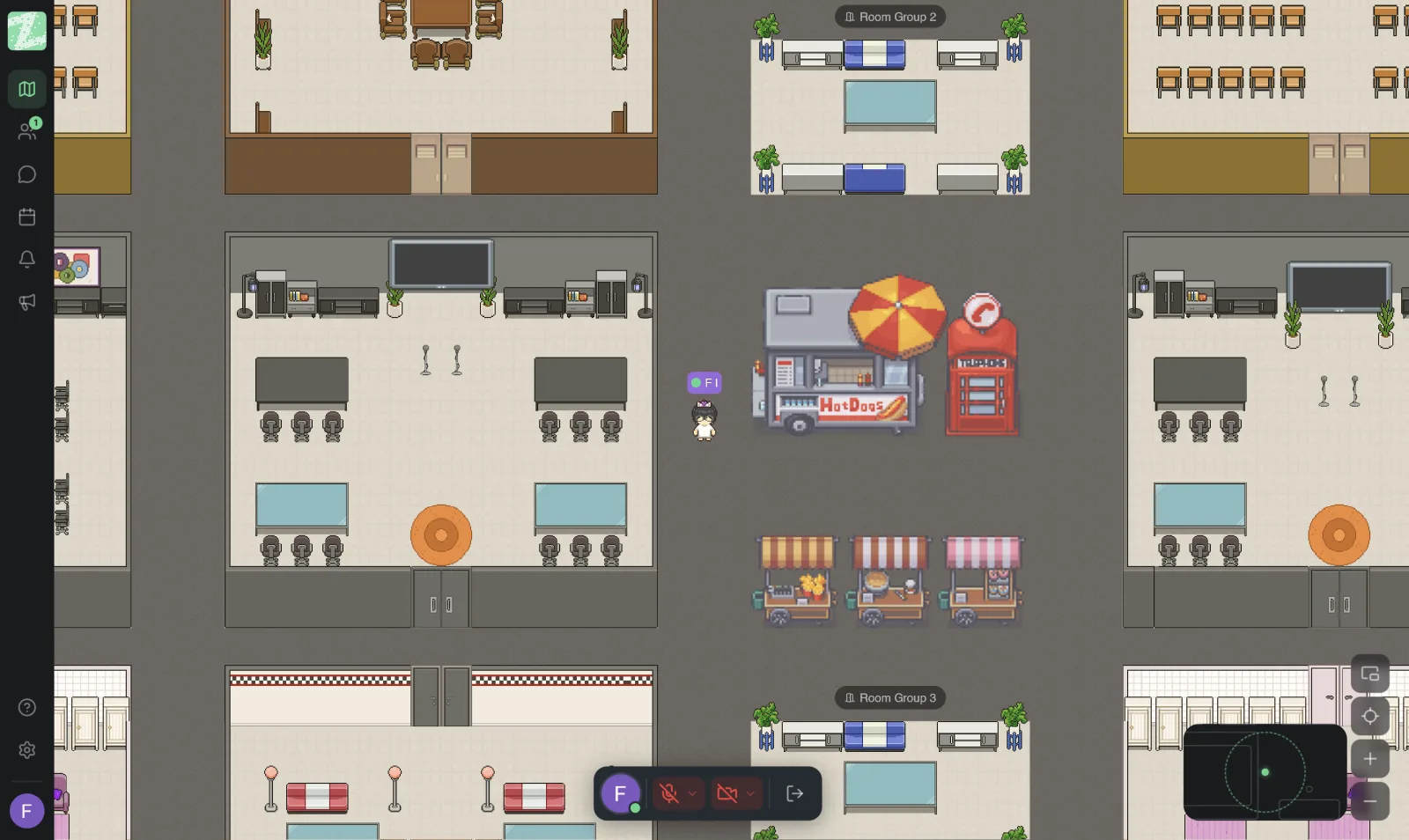
Zyra World runs in the browser with no install. Team members move as avatars around a shared map divided into rooms and private zones, and talk with proximity audio and video. Screen sharing and built-in chat sit alongside: direct messages, channels, group chats, threaded replies and file sharing. A space builder lets you lay out your own office, and the interface comes in Thai and English.
A fit for: Remote teams that want conversation and shared work in the same environment rather than another standalone calling tool.
Pros
- Proximity audio and video support the spatial conversation model this category is built around.
- Chat gives the team a written option next to voice.
- Avatars, rooms and private zones make it visible who is where and which conversations are open.
- Screen sharing supports discussions that need more than a spoken explanation.
- The Free plan covers up to 25 members, 1 space, 3 rooms and 2 GB of storage. Pro and Enterprise plans are coming soon.
- Voice, video and screen sharing are streamed live and are not recorded or stored.
Cons
- A shared virtual office adds a working environment to your existing habits, so agree what belongs there first.
- It is more than you need if teammates only want to join a scheduled call and leave.
- Avatars and spatial movement require a different routine from picking a name in a contact list.
What to check before choosing
Use a real work task. Have one teammate explain a document while another asks questions and follows the screen share. Then switch to chat and see whether the written follow-up stays connected to the work.
Define the office's purpose before asking everyone to join. An optional coworking space and an expected daily workplace need different team agreements, and neither should become a silent requirement to stay visible all day.
Verdict: a good fit for shared-office use; skip it if scheduled calls already meet your needs.
2. Gather: avatar-led interaction
Gather describes itself as a virtual office, with avatars, and its site highlights hearing nearby conversations. People move around the space and meet through it.
Choose Gather when moving around the office is part of the experience you want, not an extra step your team will tolerate. Avatars give movement a clear role: people walk up to one another instead of picking everyone from a participant list.
A fit for: Teams that want avatar-led interaction to shape their virtual-office experience.
Pros
- Each person's position is part of the conversation interface.
- Moving gives a concrete way to approach a teammate.
- The office metaphor gives informal interaction a different setting from a standard meeting grid.
Cons
- Movement adds a step between arriving and talking to the person you need.
- It can be a mismatch for teammates who prefer a direct video-room interface.
- A visible avatar does not tell you whether its owner is ready to be interrupted.
What to check before choosing
Ask a teammate to find a specific person without coaching. Watch whether they understand where to move, when a conversation starts and how to leave it. A space that needs constant explanation is not ready to be your default workplace.
Repeat the test with someone who did not help set up the environment. Familiarity hides confusing movement or boundaries.
Verdict: a good fit for avatar-led interaction; skip it if spatial movement feels like unnecessary work.
3. SpatialChat: video-centered spatial rooms
SpatialChat describes itself as an all-in-one virtual events and meetings platform. According to its help center, how loud you hear others depends on how close you are to them.
It is the clearest alternative for teams that want proximity interaction without making avatars the center of the experience. The room stays spatial, but people are shown through video rather than office characters.
A fit for: Teams that prefer a video-centered room for informal conversations and gatherings.
Pros
- Distance-based audio connects movement with conversation.
- The video-centered format is a distinct alternative to an avatar-based office.
Cons
- Moving between conversations still means learning a spatial interface.
- It does not provide the same avatar-led office experience.
- The team still needs explicit habits for joining, leaving and avoiding unwanted interruptions.
What to check before choosing
Set up separate conversations and ask someone to move between them. Check whether they know where to stop and whether leaving feels clear to everyone. The goal is an understandable conversation boundary, not just working microphone access.
If people prefer cameras off, include that in the trial instead of assuming everyone will be on video.
Verdict: a good fit for spatial video conversations; skip it if your priority is an avatar-based office.
How this comparison works
The apps are separated by interaction model and intended use. We did not run benchmarks or measure performance, and there is no universal winner for every team. The criteria are conversation clarity, approachability, shared work, interaction style, focus boundaries and joining experience.
Third-party descriptions come from each vendor's own pages: Gather, SpatialChat and the SpatialChat help center. They were checked in November 2026. Features can change, so confirm on the vendor's site before you decide.
A category match earns a shortlist place. A successful team trial earns the final choice. Use the same task for every app so visual preference does not crowd out practical differences.
Run a short team trial before choosing
Set aside 15 minutes with 3 teammates. These are suggested trial settings, not product limits. Use a real question or document so you test work rather than an office tour.
- Find teammates. Ask participants to enter and locate one another without instructions. Note where anyone hesitates.
- Start talking. Hold separate conversations, then move between them. Ask who people believe can hear them. Do not treat distance-based audio as a confidentiality guarantee.
- Share work. Spend 5 minutes explaining a real task. If screen sharing is part of your workflow, test it directly.
- Leave clearly. Ask someone to finish a conversation and return to focused work. Agree how the team signals that transition. A working office needs a clear exit as well as an easy entrance.
Afterwards, ask each participant which step needed explanation. Fix the team rule or reconsider the interaction model before expanding use.
Which proximity voice chat app should you choose?
Zyra World suits remote teams that want proximity voice chat inside a shared virtual office. Choose Gather when the avatar-led experience is your main requirement, and SpatialChat when a video-centered room fits better.
If you are undecided, start from the work you want to improve. A quick question, a shared review and an informal gathering place different demands on the space. Pick the app that handles your most frequent use case without repeated explanation.
Keep your scheduled-meeting workflow during the evaluation. You are choosing where spontaneous interaction belongs, not replacing every communication tool at once. To try Zyra World, start with the Free plan or see the features.
FAQ
What's the best proximity voice chat app for a remote team?
Choose by interaction style: a shared virtual office, an avatar-led environment or a video-centered room. Zyra World fits a shared office, Gather fits avatar-led interaction, and SpatialChat fits video-centered rooms.
What does proximity voice chat mean?
It ties the audio experience to participants' positions in a shared virtual space. Moving closer or farther changes who you talk with, instead of keeping everyone in one fixed call.
Is Gather better than SpatialChat?
Neither is better for everyone. Gather fits avatar-led interaction and SpatialChat fits a video-centered room. Test whether your teammates prefer moving characters or a video-first space.
Can proximity voice chat replace scheduled meetings?
It does not need to. Use it for spontaneous interaction and keep scheduled calls where a defined attendee list and agenda serve the task better.
Does moving away make a conversation confidential?
No. Do not treat distance as a confidentiality guarantee. Check the app's documented audio behavior and use a private channel for sensitive discussions.
How should a remote team test a virtual office?
Test finding a teammate, starting a conversation, sharing real work and leaving clearly. Include someone unfamiliar with the setup so the trial exposes steps that experienced people take for granted.
Do avatars mean someone is available to talk?
No. Agree on availability and focus habits before making a shared space part of your team's working day.
One last thing
Decide what presence does not mean. Being visible in a virtual office should not automatically mean being available, watching the room, or inviting a conversation.
Write that rule before inviting the team, and make leaving a conversation as acceptable as starting one. The app supplies the space; your team decides whether working there feels natural.
Keep Reading
- What Is an Online Office? How It Differs From Google Meet
- Virtual Office Etiquette: When to Walk Up and Talk
- Gather Town Alternatives for Thai Teams: Pick by Criteria
- 10 Best Virtual Office Platforms for Remote Teams (2026)
Try Zyra With Your Team
Try Zyra free for teams of up to 25 members. It runs in the browser with nothing to install, so you can test whether it fits how your team works before you decide.
Start using Zyra free for teams of up to 25 members
Try Zyra with your team
Free for up to 25 members. It runs in your browser, so there is nothing to install, and there are Android and iOS apps too.