
One Task, Asked in Three Places, Answered Differently
Here is a hypothetical. A 14-person agency looks after five clients. A designer posts a banner in the project's LINE group (LINE is a popular messaging app in Thailand). The account manager replies in Slack that the client wants the color changed. A developer asks for a progress update by email. In the end there are three versions of the file, and nobody is sure which one is the latest.
Work at agencies and software houses has its own shape: many projects overlap, one person gets pulled onto several jobs, and people from different functions (account management, creative and development) have to talk often. The problem is not a lack of tools. It is that conversations are scattered across several channels and nobody knows who is free.
This article suggests ways to use a virtual office for this kind of work. If the concept is new to you, read What Is an Online Office? first.
1. A 10-Minute Morning Stand-Up: Walk Into the Room Instead of Sending a Link
Instead of creating a meeting link every morning, the team agrees on a fixed time and walks their avatars to the team's meeting room. Audio and video connect when avatars are close to each other. Anyone who is late can simply walk in, without waiting for someone to send them a link.
A rule that keeps it short: everyone answers three questions. What did you do yesterday? What are you doing today? What is blocking you? Anything that needs a deeper discussion moves to a smaller conversation afterwards.
2. Quick Questions Without Booking a Meeting
A question that takes 30 seconds to answer should not turn into a 15-minute appointment. In a virtual office, the designer walks over to a developer sitting nearby and asks, "What size should this button be?" The question gets answered, and they walk back.
This works when you can see who is free. If the other person is in a conversation or in a quiet room, wait or leave a message instead. For the etiquette worth agreeing on, see proximity chat etiquette in a virtual office.
3. Reviewing Work With Screen Sharing
An account manager wants the creative to explain the work before it goes to the client. In a virtual office, the creative shares their screen in the meeting room and walks through it point by point. Everyone in the room sees it and can comment right away, which reduces revision rounds caused by misunderstandings.
Screen sharing and video calls are part of the Pro plan, which the pricing page lists as coming soon. The Free plan includes proximity chat and private messages.
4. Split Zones by Project or Function
An agency with several clients might set up rooms by project, for example a Client A room, a Client B room and a shared room. People working on a project go to that room. Anyone walking past can see who is working on what, and nobody has to keep every project's group chat open at once.
The Free plan includes 3 rooms. If you need more rooms or want to design your own map, you need Pro. For the full setup steps, read Set Up Your Team's First Virtual Office in 10 Minutes.
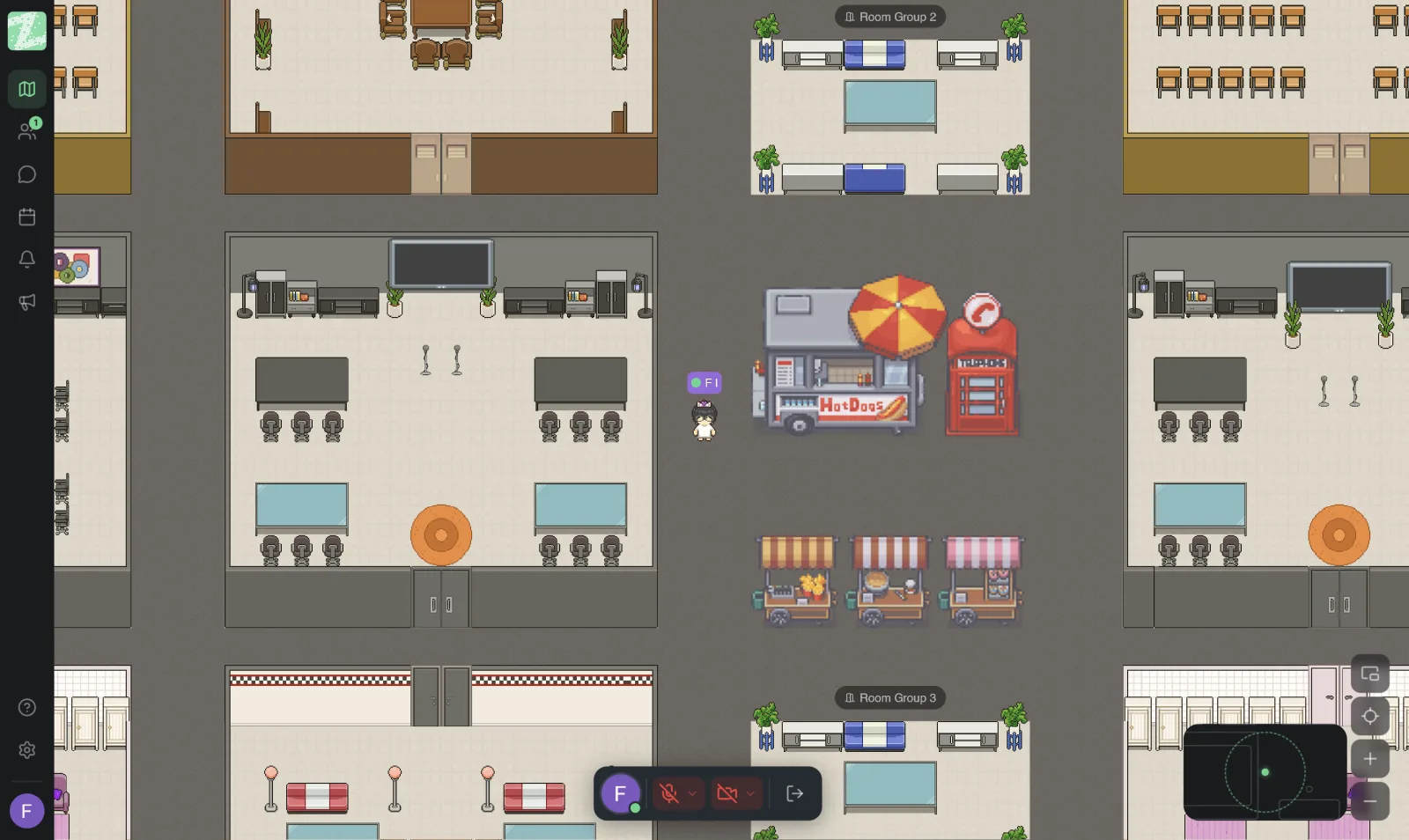
5. Use Private Rooms for Confidential Client Work
Some work, such as an unreleased campaign plan or client data, should not be overheard by people outside the project. Zyra's private zones let a team walk in and talk without being disturbed from other parts of the space. They are not a substitute for your company's security policy, though. Check your client contracts and personal data rules alongside them. For the basics, see data security and PDPA for remote teams (PDPA is Thailand's Personal Data Protection Act).
What a Virtual Office Does Not Replace
- Client meetings. Clients are usually used to Google Meet or Zoom, so you can keep using those tools for external meetings. Use Zyra for your internal team's work.
- Task and file management. Keep using Trello, Notion, Figma or GitHub as before. A virtual office helps with conversation and knowing who is free; it does not track work for you.
- Chat channels and threads. According to the pricing page, channels and threads are in the Pro plan, which has not launched yet, so don't use chat as the place where work decisions are stored. Record important conclusions in your team's task management tool.
How to Pilot It With an Agency Team
- Pick a small team of 3–5 people working on the same project.
- Run the morning stand-up in the virtual office for two weeks.
- Count how many video calls for small questions disappeared, and ask who feels it has become easier to ask questions.
- If it works, extend it to other teams and add rooms by project.
Sources and further reading
Frequently Asked Questions
Can a small agency use the Free plan?
Yes, if the team has no more than 25 people. The Free plan includes 1 workspace, 3 rooms and proximity chat. A team that outgrows that, or needs screen sharing and channels/threads, needs Pro. Check the latest status on the pricing page.
Can I invite clients into the office?
The features page does not currently list a dedicated feature for outside guests. If you want to use it with clients, contact our team to ask about the right approach.
Is it for dev teams, or better suited to creatives?
It works for both, because it solves the same problem: asking quickly and knowing who is free. A developer who needs long stretches of focus can use a quiet room.
Can it replace Slack or LINE entirely?
We do not recommend replacing them entirely. Use it to cut down on small, quick-question chats. Decision records should stay in a tool that keeps permanent history. See the problem of LINE and work chat overload.
Try It With a Small Team First
Open your team's workspace for free for teams of up to 25 people. It runs in the browser.
Start using Zyra free for teams of up to 25
Try Zyra with your team
Free for up to 25 members. It runs in your browser, so there is nothing to install, and there are Android and iOS apps too.