
TL;DR
- Zyra World suits support teams that want proximity audio and video, built-in chat, avatars and screen sharing in a browser-based space.
- Gather suits teams that want a virtual office where they can hear nearby conversations.
- Zoom suits teams that prefer scheduled or ad hoc video meetings with screen sharing for escalation.
- Zyra World is not a ticketing or helpdesk tool.
- A virtual office does not replace a ticket queue or knowledge base. Choose around your support workflow.
Why this matters
A difficult customer question creates two jobs: resolve the issue and find the person who can help. A virtual office addresses the second job by giving your team a shared place to talk. Your ticketing system remains the record of the customer interaction.
Judge the handoff rather than the look of the workspace. Can an agent ask a question without interrupting everyone? Can a specialist join, see the relevant context and return to focused work?
The best choice makes help accessible without making every agent permanently interruptible.
What to look for in virtual office software for support
Each criterion connects a software choice to a support task.
- Access to help: An agent needs an obvious way to reach the person covering escalations.
- Conversation boundaries: Quick questions, sensitive discussions and focused work need different expectations about interruption.
- Shared context: Screen sharing should support troubleshooting without exposing unrelated customer information.
- Written follow-through: Chat can support a conversation, but the resolution still needs a durable home in your support records.
- Shift fit: Your rules must account for coverage changes, breaks and colleagues working at different times.
- Everyday usability: Agents should be able to explain how to get help without a long manual.
Treat these as acceptance criteria and test the actual workflow your agents will use.
At a glance
The order reflects distinct use cases. It is not a measured ranking of speed or productivity.
| Software | Best for | Approach | Thing to weigh |
|---|---|---|---|
| Zyra World | Proximity-based support teamwork | Avatars on a shared map with rooms, private zones, proximity audio and video, chat and screen sharing | Nearby conversation needs clear interruption rules |
| Gather | Spatial team interaction | Virtual office where you can hear nearby conversations | Spatial conventions are a habit to learn |
| Zoom | Meeting-led escalation | Video meetings with screen sharing | Each escalation needs someone to start or join a meeting |
All three options need a separate agreement about where customer decisions are recorded. A conversation can solve a problem without leaving a usable record.
1. Zyra World: nearby support help in the browser
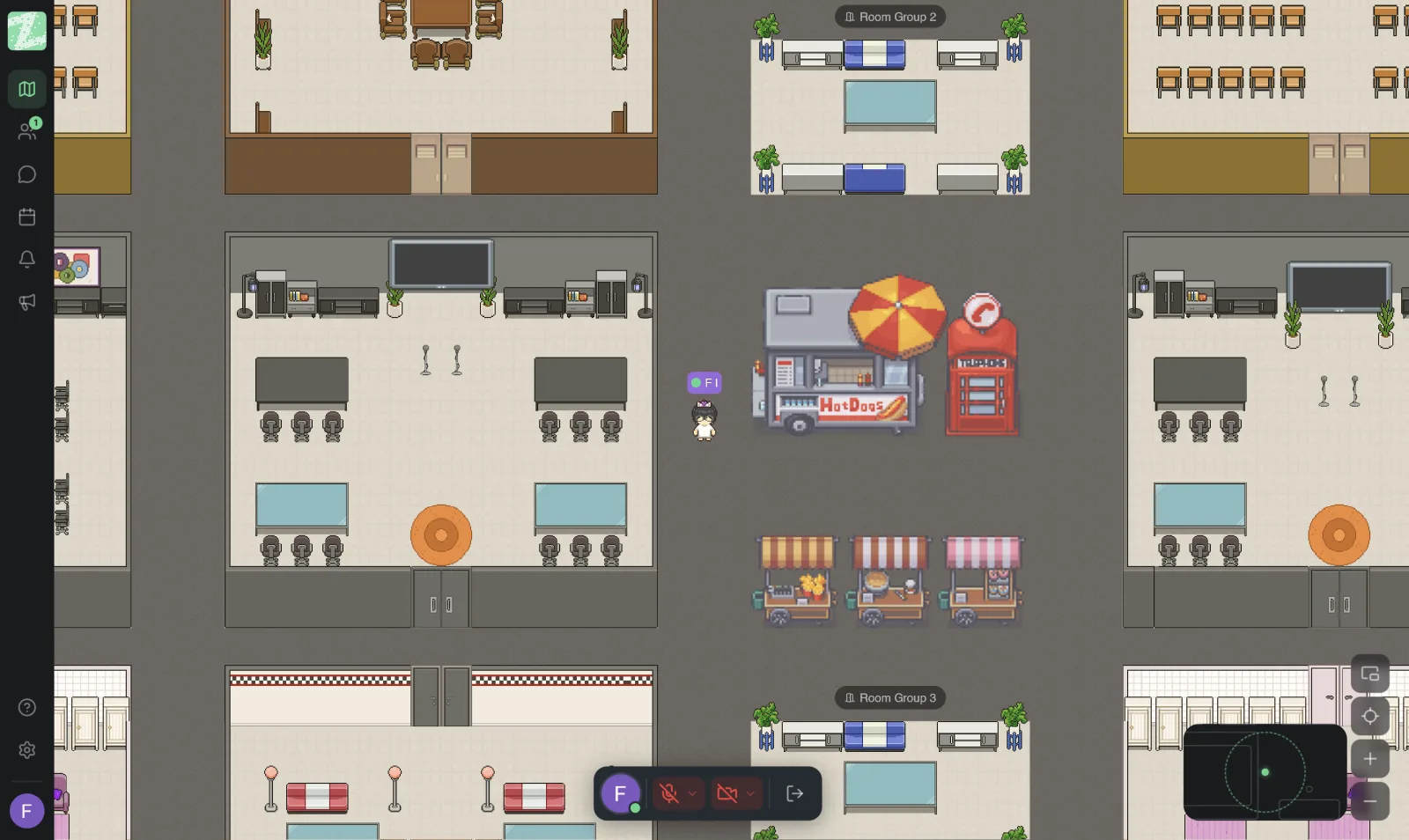
Zyra World runs in a browser tab, with nothing to install. Each person is an avatar on a shared map divided into rooms and private zones, and audio and video depend on how close avatars are to each other. Anyone can share their screen to look at an issue together. Chat is built in, with direct messages, channels, group chats, threaded replies and file sharing.
It fits support teams whose main problem is reaching a colleague quickly during the working day, not managing the ticket queue itself.
Pros
- Proximity audio and video give nearby conversation a place in the shared workspace.
- Chat gives agents a written channel alongside spoken discussion.
- Private zones give a separate space for conversations.
- Screen sharing supports working through the same issue together.
- Thai and English interface; roles and permissions help manage who can do what.
- The Free plan covers up to 25 members, 1 space, 3 rooms and 2 GB of storage. Pro and Enterprise plans are coming soon.
- Voice, video and screen sharing are streamed live and not recorded or stored.
Cons
- Proximity-based conversation needs agreed boundaries so agents can concentrate on customers.
- A shared workspace does not itself establish who owns an escalation.
- Spoken resolutions still need to be recorded in your support system. Zyra World is not a ticketing or helpdesk tool.
Best for: teams that want quick, conversational access to support colleagues while keeping written customer work elsewhere.
Rehearse a realistic escalation from question to resolution. Ask an agent to bring the necessary context, involve a teammate and document the answer afterward.
2. Gather: spatial team interaction
Gather describes itself as a virtual workspace, and its FAQ defines a virtual office as an online workspace where remote teams can see each other. Its homepage lists hearing nearby conversations (source: gather.town, checked November 2026).
Choose Gather when your team specifically wants a shared place to be together. Do not choose it just because the office metaphor looks appealing; agents need to find that style useful during real support work.
Pros
- Hearing nearby conversations gives informal talk a recognizable setting.
- Overhearing a quick discussion can suit a short question.
- A shared space gives the team an environment beyond a message thread.
Cons
- Agents need to learn the team's conventions for interruption.
- A spatial setup can create ambiguity unless help locations are clearly explained.
- Informal discussions need a separate habit for capturing decisions.
Best for: teams that value spatial interaction and want informal contact alongside scheduled collaboration.
Ask someone unfamiliar with the setup to find the escalation lead. Watch whether they know where to go and whether approaching that colleague is welcome.
3. Zoom: meeting-led escalation
Zoom presents its Meetings product as video conferencing with HD audio and video, collaboration tools and chat channels that work before, during and after meetings; its feature navigation lists screen sharing and breakout rooms (source: zoom.com, checked November 2026).
A meeting-led approach gives escalation a clear shape: an agent asks, a specialist joins a call and the screen is shared. The conversation is deliberate, not something a colleague overhears.
Pros
- A call is an explicit request, so it is clear when someone is asking for help.
- Screen sharing supports troubleshooting the same issue together.
- Many teams already know how to start or join a meeting.
Cons
- Each escalation needs someone to start or join a meeting, which adds a step for quick questions.
- A meeting does not show who is available before you ask.
- It is not a ticketing or helpdesk tool, so outcomes still need recording elsewhere.
Best for: teams that want deliberate, scheduled or on-request calls for escalation rather than an always-open shared space.
Time how long it takes an agent to get a specialist on a call and share the relevant screen, then compare that with your quick-question needs.
How these options were compared
We did not run hands-on tests or benchmarks. The comparison follows the criteria above: access to help, conversation boundaries, shared context, written follow-through, shift fit and everyday usability. Third-party descriptions come from the vendors' public websites; Zyra World is our own product, so weigh that when reading. Verify details with each vendor before you decide.
Build the support handoff before arranging the office
A virtual office works best when agents know what happens after they ask for help. Use this three-stage handoff whichever platform you shortlist.
Ask for help
Give the question enough context to be answerable: the customer problem, what you have already checked and the decision you need. Make clear who covers escalation, so agents do not have to infer it from an avatar's location.
Move the discussion
Separate a brief question from a longer troubleshooting session. If it needs sustained attention, move it away from colleagues handling other work. Before sharing your screen, close unrelated customer records and personal notifications, and share only what the issue needs.
Record the answer
Put the customer-specific decision in the ticket or other approved record. If the answer applies more broadly, update your knowledge material too. The handoff ends when the next agent can understand the outcome without reconstructing the spoken conversation.
Keep repeat questions out of the escalation space
Distinguish an unavailable answer from an answer that is hard to find. The first needs investigation. The second needs better organization, not another conversation every time.
When a teammate answers a repeat question aloud, ask what stopped the agent from finding it independently: unclear wording, an outdated document, or an answer scattered across places. Fix that underlying problem. Use the virtual office for judgment and discussion, not as a substitute for findable instructions.
Run a pilot that reflects a real support shift
We suggest a 30-minute pilot with three scenarios: a quick policy question, a troubleshooting discussion and a shift handoff. These are evaluation ideas, not benchmarks. Include an agent, a specialist and the person responsible for shift coverage.
- Quick question: Can the agent identify the right helper and ask without disrupting unrelated work?
- Troubleshooting: Can both people examine the relevant context while keeping unrelated information out of view?
- Shift handoff: Can the incoming colleague find the decision and see who owns the next action?
Then add a 10-minute focus period with no casual interruptions, to check that your team can use the office quietly and not just start conversations. Record friction in plain language, such as unclear ownership, repeated explanations or missing notes, and resolve it before expanding the rollout.
Which one should you choose?
Choose Zyra World if you want proximity-based teamwork with chat, avatars and screen sharing in the browser; you can start on the Free plan (see plans and features). Choose Gather when spatial interaction is central to what your agents want. Choose Zoom when meeting-led escalation better matches your process.
If nobody can explain how the office improves a specific support handoff, pause and define the problem first.
FAQ
What is the best virtual office software for customer support teams?
It depends on your workflow. Zyra World suits proximity audio and video, chat, avatars and screen sharing; Gather suits spatial interaction; Zoom suits meeting-led escalation.
Does a virtual office replace customer support software?
No. Use it for internal collaboration and keep customer cases, ownership and resolution history in your support system.
Is a virtual office better than video meetings for support?
Neither wins by default. Test which makes finding help clearer and faster for your agents.
How do you stop a virtual office from interrupting support agents?
Set explicit rules for focus time and approaching colleagues, and assign escalation coverage so agents know who can accept questions.
What should a support team test before choosing?
A quick question, a troubleshooting discussion and a shift handoff. Check how agents find help, share context and record the outcome.
Can support agents share customer information in a virtual office?
Only under your organization's approved security and privacy rules. Limit shared content to what the discussion needs and assess the platform against your requirements first.
Should every agent stay in the virtual office all day?
Do not make continuous presence the default. Define when the workspace supports coverage and collaboration, and protect focused work and breaks.
One last thing
Test the office when the usual escalation expert is absent. Ask another teammate to find the previous answer and identify the next owner. If that fails, fix the record and coverage rules before changing the room layout.
Related guides
Keep Reading
- Best Virtual Office Software for Small Teams (2026)
- Effective Online Meetings: 9 Ways to Start Today
- Work Chat Overload on LINE: Rules Your Team Can Use
- What Is an Online Office? How It Differs From Google Meet
Try Zyra With Your Team
Try Zyra free for teams of up to 25 members. It runs in the browser with nothing to install, so you can test whether it fits how your team works before you decide.
Start using Zyra free for teams of up to 25 members
Try Zyra with your team
Free for up to 25 members. It runs in your browser, so there is nothing to install, and there are Android and iOS apps too.